Documentation
Objective
Each team is provided with a server (called the vulnbox) which is running a set of custom vulnerable services. These services generally provide some means of authenticating and storing secret information. Each service has one or more intentional vulnerabilities that allow an attacker to access this secret information.
Every tick (generally 60-180 seconds, depending on the game), a scoring server will check each service by using its basic functionality, planting a new flag (which matches the regex
[A-Z0-9]{31}=), and retrieving a recent flag. These three checks are used to determine the Service Level Agreement (SLA) score for each service. Teams gain points for each tick in which all SLA checks pass - if any SLA checks fail, then no points are awarded for that tick.Teams also gain points by exploiting other teams' services to steal the flags planted by the scoring server. Each flag has a lifetime of 5 ticks, after which it no longer awards points (and the scoring server will no longer try to retrieve it). When stolen flags are submitted, the stealing team gains points, and the team from which the flags were stolen loses an equal number of points.
Connecting to the range
Each team will receive a unique team join link (which looks like
https://demo.glitch.ad/join/0123456789abcdef). On the join page, first enter your personal username (whatever you want). Then, either download the VPN configuration, or connect to the web console.VPN connection is suggested, but if you are unable to connect to the VPN then the web console provides a backup connection method using only your browser. The VPN is a WireGuard tunnel, so make sure you have wireguard installed (instructions: https://www.wireguard.com/install/).
Getting Started
After connecting to the VPN, log into the vulnbox using the command
ssh root@vulnbox.glitch.ad. No password is necessary - authentication is automatically established based on VPN source IP.All challenge services are dockerized, with each service's source code in its own directory within the
/service directory. After making changes, services may be restarted with the command restart from within each service's directory (which rebuilds and restarts the docker containers). Additionally, services may be cloned to work on remotely using the command git clone ssh://root@vulnbox.glitch.ad:/services/<service-name> (as long as the remote machine is connected to the VPN).There is a built-in
glitch command on the vulnbox which provides the ability to display game information, list SLA status and scores, submit flags, manage network blocks, and throw exploits. For example, glitch block add badstring adds a network block that will drop all traffic containing the string "badstring". More information on available options can be displayed by running glitch help on the vulnbox.Each service's network traffic is automatically routed through an instance of mitmproxy, which provides the ability to monitor network traffic live. The web interfaces for these proxy instances are available in the Proxies dropdown menu on the scoreboard.
Each flag that is planted has an associated Flag ID, which is commonly something like a username or document ID used to access the flag. The Flag IDs for all currently active flags are published to the scoreboard API, and can be listed using the
glitch targets command. It is almost always required to use these Flag IDs when exploiting the service in order to access the correct flag - for example, to select the correct user to target with a SQL injection attack.Exploits should be written in python, and should accept two command-line arguments: the IP of the target, and the Flag ID. Once an initial exploit is created, it may be tested by running
glitch exploit test <exploit_path>, which will run it against the NOP team. If it is successful, it can then be automatically thrown against all targets in the background using the command glitch exploit throw <exploit_path>. This will keep running in the background, and does not need to be re-run each tick. To stop throwing the exploit, simply delete or rename the exploit file. Any updates to the exploit file will automatically be applied.Scoring
In general, scoring is designed to model a marketplace, in which both service access and secret information are valued based on supply and demand. The number of customers scales proportional to the square root of the number of teams. Each tick, all customers are divided equally among all teams with functioning services (awarding SLA points). Additionally, each piece of secret information (flags) are sold with a value inversely proportaional to many other teams already have that information.
Each service's score is calculated independently, which are summed together to produce the team's total score. There are three components to each service score: SLA, offense, and defense. The sum of these three scores (positive SLA and offense points, and negative defense points) produces the total service score:
service_score = sla_score + offense_score - defense_scoreSLA score is based on the total number of ticks in which all SLA checks were passed. The specific value of SLA points for each tick is:
sla_score = qrt(total_teams) / sqrt(teams_passing_sla)All teams passing SLA each tick receive the SLA value of points for that tick, while all teams failing recive no added points. For example, if there are 9 teams and 4 passed SLA checks last tick, those 4 teams would each receive 1.5 SLA points and the other teams would receive no points.
Offense points are the sum of point values for each flag submitted. Each flag's point value is calculated based on the total number of teams, and how many teams steal that flag. The specific value of each flag is computed as:
flag_value = 1 / sqrt(teams_stealing_flag)Flag values are recalculated retroactively every tick, so submitting a flag before another team does not yield additional points (as long as it is submitted before it expires).
Defense points are equal to the negative of the sum of the values of all flags lost by the team. For example, if there are 4 teams and Team 1 steals a flag from Team 4 during tick 1, Team 1 will gain 1 offense point and Team 4 will lose 1 defense point. If Team 2 steals the same flag the next tick, then Team 2 will receive 0.71 points, and Team's score will be retroactively recalculated with a flag value of 0.71. In this situation, Team 4 would end with a defense score of -1.41 points (since it lost 2 flags).
Scoreboard updates are released at the conclusion of each tick. This means that the scoreboard may be up to one tick behind the current state of the game at any given time. For example, submitting a flag at the start of a tick will not reflected added points on the scoreboard until it updates after that tick.
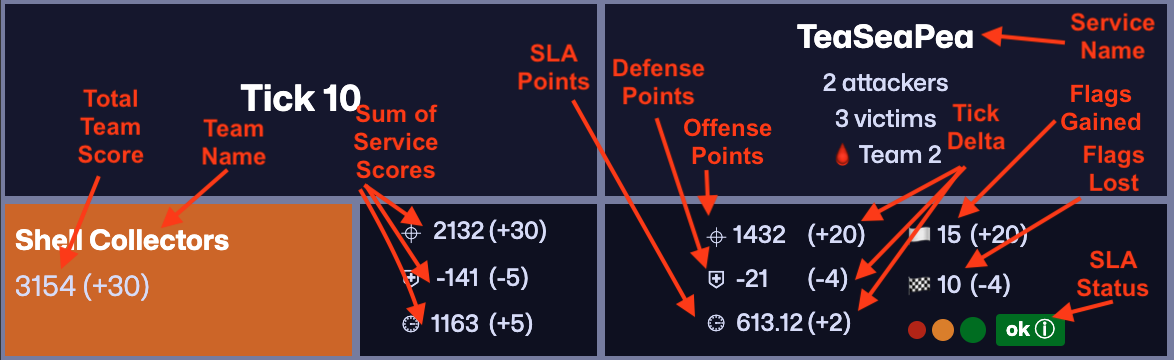
The scoreboard includes rows for each team, and columns for each service. Each team's points per service are shown in the cells across its row, with scores broken down by offense, defense, and SLA (top to bottom). Score deltas (difference since last tick) are shown in paranthesis, and total flags gained and lost (with deltas) are also shown. Current SLA status is indicated by the large colored square in the bottom-right corner of the cell, which is green if all checks pass, orange if some fail, and red if all fail. Additional information about failed checks is shown when hovering over the status color. The three colored circles to the left of the status color show the past 3 ticks of historical SLA status, to indicate how long a service has been down.
Network Layout
Every team is assigned a /24 subnet, in the format
10.100.X.0/24, where X is the team ID. The vulnbox (which hosts all of the challenge services) is always assigned the first IP in the team's subnet. For example, Team 5's vulnbox is assigned 10.100.5.1. Players are assigned VPN IPs in the range 10.100.X.5 - 10.100.X.254, providing 250 maximum possible VPN configurations per team.All traffic is routed through the central game router at
10.100.0.1. This router provides source NAT for all traffic, meaning that the source IP for all traffic reaching the vulnbox appears as 10.100.0.1. This is done to prevent teams from blocking specific IPs, and also provides IP-based authentication for game API tasks such as submitting flags and SSH access.VPN SSH traffic is automatically routed to each team's own vulnbox, so it is only possible to SSH into your own vulnbox from the VPN. Each vulnbox has full internet access, but does not have any ports exposed publicly - only outbound connections are allowed.
In addition to the registered teams, there is also a NOP team, which exists to provide known-vulnerable target to test exploits against. Flags captured from the NOP team still award points, so it is still valuable to run exploits even if all other teams have patched their services. The NOP team always has Team ID 1 (
10.100.1.1), and can also be reached at nop.glitch.ad.The scoreboard includes a full REST API to access scores, SLA checks, get flag IDs, and submit flags. Documentation for this API is available at https://glitch.ad/docs. However, all of this functionality is also provided by the
glitch command on the vulnbox, so it is normally not necessary to interact with the scoreboard API directly.Strategy
Generally, the first step is to begin analyzing the service source code to identify vulnerabilities and begin developing exploits. Additionally, it is often helpful to monitor the provided proxies to identify normal SLA traffic patterns and help with identifying and blocking exploit traffic.
Once an exploit is found, you should begin patching the vulnerability in their own service, while also developing an exploit to throw against other teams. It is generally best to test this exploit against the NOP team, which is guarunteed to be vulnerable.
If another team begins exploiting you (you begin losing defense points), you should carefully review recent inbound network traffic in the services proxies to help identify the vulnerability. You can then begin working to reverse-engineer the exploit, develop a patch or network block, and copy the exploit to begin throwing it against others. Similarly, when writing exploits, it is important to make the exploit mirror the signature and functionality of the SLA checks as closely as possible to avoid detection.
Services generally include vulnerabilities relating to web security, cryptography, and binary exploitation. Some services may only be provided in binary form and require reverse engineering and binary patching to secure, and network forensic skills are required to identify and reverse engineer exploits from traffic analysis. In general, vulnerabilities will not result in remote shell access, so establishing persistence and reverse shell capabilities are not important.